Saturday, 10 May 2014
Friends of Technology: Twitter Revamps Security to Fight Account Hijackin...
Friends of Technology: Twitter Revamps Security to Fight Account Hijackin...: To better protect its users from having their accounts pirated, the social network Twitter has ann...

Twitter Revamps Security to Fight Account Hijackings
To better protect its
users from having their accounts pirated, the social network Twitter has
announced two new measures: a simplified password reset procedure and
enhanced identity verification during suspicious login attempts.
Twitter users can now reset their
passwords at any time by requesting a special confirmation code, which
they can choose to receive either by email or text message. Having a
choice between the two methods should come in handy for people who no
longer use the email address they signed up with.
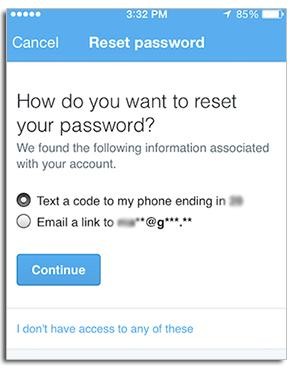
In addition, Twitter has
introduced personalized questions that only the account holder can
answer as a means of verifying identity during suspicious log-in
attempts, such as those from a new device or IP address, for example.
Updates to the email or phone number linked to an account can be made in Twitter’s settings.
How to Print Out and Wear Your Own Google Image Search Results

The other day, my unexpectedly fashion-conscious editor spotted this eye-catching ensemble on Twitter: clothing printed with results of the wearers’ Google Image searches for themselves.
Finally! After so many months of
chatter about smartwatches and Google Glass, these duds are an example
of “wearable tech” that’s actually worth a closer look.
Turns out this stylish duo is Manuel Palou and Moises Sanabria, who work together as all-purpose tech/art/design entity Art404, collaborating on a variety of work that “straddles the digital and the physical.”“Our idea behind these pieces is to wear a physical manifestation of your online identity,” Palou explained to me via email. The “Google Image Suits” were made by searching the creators’ names and using a Chrome extension to capture all the results up to the “Show more results” buffer in one image.
That image was run through a script that picks out and highlights the “most relevant” results — putting the highest-ranked images on the suit’s chest, lesser ones on the sleeves, and still-lesser ones on the pants. “Relevancy goes from top to bottom,” as Palou put it.
Finally, the outfits were actually produced by way of Print All Over Me, a fascinating online service that lets you add all manner of digital collages to a variety of objects.
According to the Print All Over Me website, the sweatshirt costs $68, while the custom-printed pants will run you $99.
“We don’t look at the suits when making them, and since the whole process is automated, we are just as surprised as anyone else when we get the suits,” Palou adds.
The duo’s Google Image Suits turn out to be an early manifestation of a project-in-progress they refer to as Avatar Apparel. The general idea: Wear clothes inspired by “your personal online brand,” Palou says.
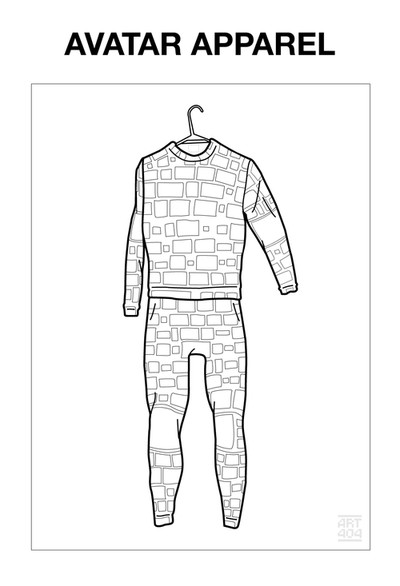
(Projects Not Found)
“Ultimately,” he explains, “we want people to get over the idea of hiding online. A private social media account is a sin. Embrace your personal brand, live in public. Optimize yourself for the search engine. Transparency will set you free.”
Keep an eye on Avatar Apparel (among other fun experiments) on Art404’s Tumblr.
Wednesday, 7 May 2014
How to Configure Your Facebook Privacy to Avoid Getting Fired

In the same way that opening your
mouth can get you in trouble, anything you post to Facebook has the
potential of putting you in hot water, too. As we showed you in this article, it can cost your job, if you’re not careful.
So if you care about being employed, here’s some advice: Get your Facebook privacy settings in order before you post.
To make sure that your posts are
reaching the right eyes, and only the right eyes, Facebook has provided
easy-to-use sharing and privacy options. Here’s how to use them (or, to
put it another way, here’s how to keep yourself out of trouble).
From the Update Status boxBefore
sending off a new post, you can actually designate who gets to see it
by clicking the drop-down button just to the left of the Post button. Here you’ll find options for sharing with the Public, which lets everyone read it, and with Friends,
which lets only people you’ve added as friends read it. You can also
share with different lists of friends, which can either be created
yourself from scratch, or by Facebook automatically.
It might be a good idea to create
a list of friends who will enjoy your rants and raves — and that does
not include your employer, or any potential employers. Here’s how.
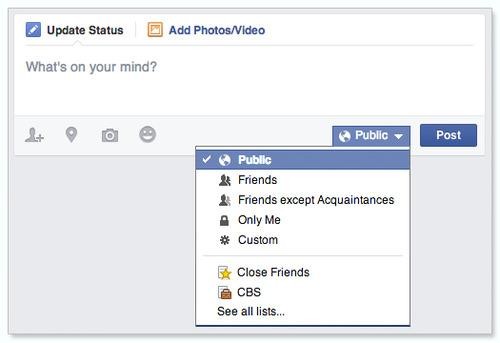
The Status Update box.
Manage lists of friendsFacebook’s
automated lists are tied to interests like school, work, and location,
as well as frequency of contact. You can edit these lists and create new
ones from the Friends settings section. Get there by clicking the Friends header on the left side of your News Feed/Home page (left below).
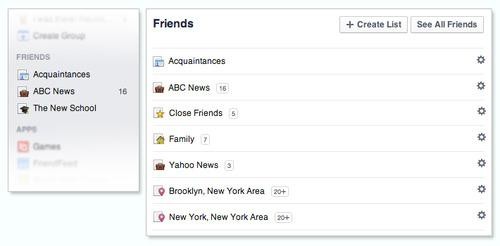
Selecting the name of a list from here (above right) will bring you to its page. Click the Manage List button, and then select the Edit List option to add or remove friends from the list (below).
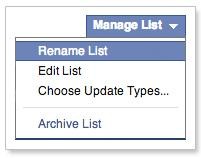
Manage List button from a list’s page.
Next, you’ll see an edit window where you can add and remove friends from your list (below).
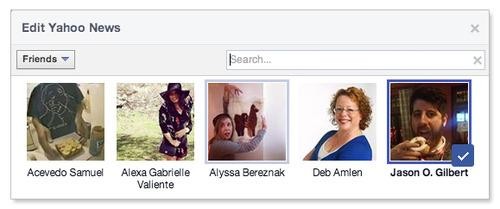
Another way to add friends to specific lists is from a friend’s profile page. Click the Friends button to show a drop-down menu with options (left below).
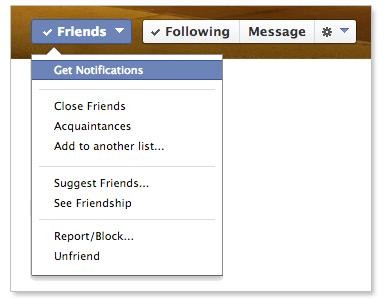
Now that you’ve created a
privacy-friendly list, make sure you’re sharing your personal posts only
with that list, and not “Public” or “Friends.”
Who can see my stuff?The
options above will keep all your future posts from reaching people whom
you’d rather they not. But what about your old posts? That’s where the Who can see my stuff? settings come in.
To view these options, click the menu arrow (below) from the Facebook home page. Then select Settings from the drop-down box.
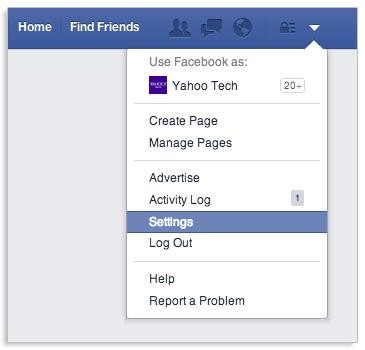
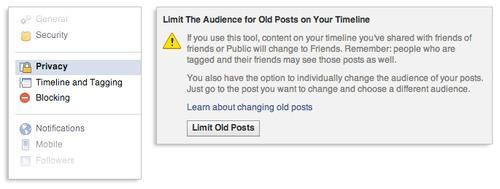
On the left side of the General Accounts Settings screen, you’ll see different categories. Select Privacy. You’ll find the Who can see my stuff? section first in the Privacy Settings and Tools screen.
Turning on the Limit the audience for old posts on your timeline option will change all of your posts that were previously public to friends-only.
The Activity LogAnother option in the same Privacy Settings and Tools menu called Review all your posts and things you’re tagged in
will bring you to the Activity Log (which can also be accessed from the
home page Settings menu). The Activity Log (below) allows you to go
through and remove yourself from other people’s posts that have you
tagged.
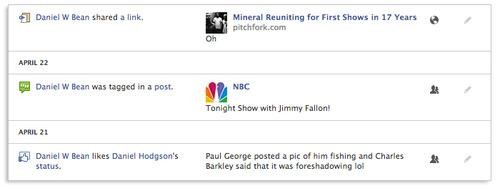
This is for the times your friends check you in somewhere you’re not supposed to be (or maybe when your mother posts an embarrassing picture of you). Clicking the pencil icon and selecting Delete will take the post out of your Timeline and remove your name off of your friend’s post. You can also manually modify the audience of your own previous posts in the Activity Log.
And that’s about it. Take these measures to avoid needless oversharing and ensure that your Facebook activity is viewable only by the groups of friends you choose. And remember, if you do choose to share posts with your boss, make sure to stay off Facebook on your so-called “sick days.”
Friends of Technology: 5 Ways to Make Your WiFi Network Safer, Faster, an...
Friends of Technology: 5 Ways to Make Your WiFi Network Safer, Faster, an...: So you just bought a new WiFi router. Or maybe you have an old one you bought years ago, plugged in,...
Subscribe to:
Posts (Atom)